
Returning Audaxity Participants: Here’s How to Easily Refresh Your DonorDrive Page
Did you take part in the inaugural Audaxity ride and use DonorDrive to fundraise last year? Good news, you don’t have to start from scratch.
You’ll need to register for the 2026 ride by going to Audaxity.org and clicking “log in” at the upper right hand corner. Once you’re registered, you can pull in your information from your previous page, saving you time and making it easier to jump right back into fundraising.
Refresh Your Personal or Team Page:
Step 1: Click on “Your Page” in the upper left-hand corner of DonorDrive.
Step 2: Select the pencil icon to edit your story.
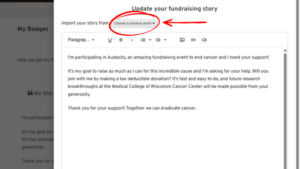
At the top of this page, you’ll see an option to import your story from a previous event. With one click, your past content, including images and text, will automatically populate. You can do the same for your team page, too.
Reconnect with Past Donors:
Did you have supporters who donated online last year? You can easily reconnect with them.
Step 1: Go to your dashboard
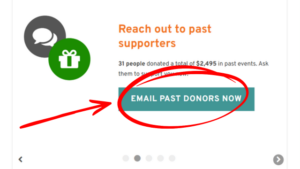
Step 2: Under “Your Fundraising,” click on “Reach out to past supporters.”
From there, you’ll see your previous contacts and even be able to load in past messages and customize. It’s a simple way to re-engage your network. Just update your message to fit your goals for the 2026 Audaxity ride!
Why It Matters
These tools are designed to make your fundraising experience faster and more effective. In just a few minutes, you can:
- Refresh your page
- Reconnect with supporters
- Track your progress and leaderboard ranking
Everything is streamlined so you can spend less time setting up, and more time doubling your impact.
For more helpful tips check out our Fundraising Resources Page.


